✓ Refurbished MacBook Pros offer significant savings over new models, often 20-50% off.
✓ Certified refurbished devices typically come with warranties and have undergone rigorous testing.
✓ Apple's Official Refurbished store provides the highest level of assurance, including a 1-year warranty.
✓ Third-party retailers can offer better deals but require careful vetting of their refurbishment process and warranty terms.
✓ Always check return policies, battery health, and cosmetic condition before purchasing.
How It Works
1
Define Your Needs & Budget
Determine the MacBook Pro model, specs (processor, RAM, storage), and features you require for your tasks. Establish a clear budget range to narrow down your search effectively.
2
Research Reputable Sellers
Identify trusted sources known for quality refurbished electronics, such as Apple's official store, reputable third-party refurbishers, or certified resellers. Prioritize sellers offering robust warranties and return policies.
3
Compare Models & Prices
Once you have a list of potential sellers, compare available MacBook Pro models, their specifications, cosmetic condition, and pricing. Pay close attention to included accessories and shipping costs.
4
Verify Warranty & Return Policy
Before finalizing your purchase, thoroughly review the seller's warranty duration and coverage, as well as their return and exchange policies. This ensures peace of mind and protection for your investment.
Navigating the Refurbished MacBook Pro Landscape: Why It's a Smart Move
Photo: Anna Shvets / Pexels
The allure of a MacBook Pro is undeniable: sleek design, powerful performance, and the seamless macOS ecosystem. However, the price tag for a brand-new model can often be a significant barrier for many users. This is where the world of refurbished MacBook Pros steps in, offering a compelling alternative that combines premium quality with substantial savings. Understanding where to buy refurbished MacBook Pro models effectively can unlock access to high-end computing without breaking the bank. But what exactly does 'refurbished' mean, and why is it such a smart financial and environmental choice?
Refurbished, in the context of electronics, typically refers to a product that has been returned to the manufacturer or a certified refurbisher, inspected, repaired if necessary, cleaned, and tested to ensure full functionality. These aren't just 'used' devices; they've undergone a rigorous process to bring them back to a 'like-new' or 'excellent' working condition. The reasons for a product being refurbished can vary widely: it might have been a display model, a return from a customer who simply changed their mind, or an item with a minor defect that has since been fixed. Crucially, reputable refurbishers will replace any faulty components, ensure the battery health is up to par, and often offer a warranty that rivals or even surpasses those on new products.
Choosing a refurbished MacBook Pro isn't just about saving money; it's also an environmentally conscious decision. By extending the life of existing electronics, you're contributing to reducing electronic waste (e-waste), a growing global concern. It's a sustainable approach to tech consumption that benefits both your wallet and the planet. Moreover, for many users, the performance difference between a brand-new, top-tier model and a slightly older, refurbished model is often negligible for everyday tasks, creative work, or even some professional applications. You might find a refurbished MacBook Pro from a year or two ago still outperforms many new Windows laptops in the same price bracket.
The key to a successful refurbished purchase lies in knowing the best sources and understanding what to look for. Not all refurbished products are created equal, and the quality of the refurbishment process, the warranty offered, and the seller's reputation are paramount. This guide will delve into the most trusted places where to buy refurbished MacBook Pro models, providing you with the knowledge to make an informed decision and secure a fantastic deal on a high-performance machine. Whether you're a student, a creative professional, or simply looking for a reliable daily driver, a refurbished MacBook Pro could be your ideal solution. Understanding the nuances of refurbished electronics is the first step towards a smart purchase.
Top Tier Trusted Sources: Where to Buy Refurbished MacBook Pro with Confidence
Photo: Ajay Lamichhane / Pexels
When it comes to purchasing a refurbished MacBook Pro, the source matters immensely. Certain retailers and platforms stand out for their commitment to quality, comprehensive warranties, and excellent customer service. Knowing these top-tier options is crucial for anyone wondering where to buy refurbished MacBook Pro models without undue risk.
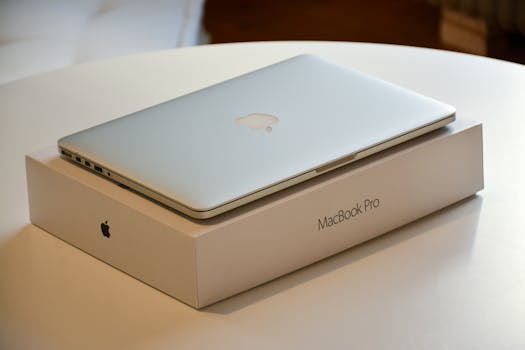
**1. Apple Certified Refurbished Store:** Without a doubt, the Apple Certified Refurbished store is the gold standard. When you buy directly from Apple, you're getting a device that has undergone the same rigorous testing procedures as new Apple products. Every Apple Certified Refurbished product comes with a one-year warranty, all original accessories (or replacements), a new battery, and a new outer shell, making them virtually indistinguishable from new. They are packaged in a new white box and even qualify for AppleCare. The only downside is that prices might be slightly higher than other refurbished options, and inventory can fluctuate, but the peace of mind is unparalleled.
**2. Reputable Third-Party Refurbishers (e.g., Back Market, Mac of All Trades, OWC):** Beyond Apple, several highly reputable third-party refurbishers specialize in Apple products. These companies often have their own stringent refurbishment processes and offer competitive warranties.
* **Back Market:** This platform acts as a marketplace for various certified refurbishers, each vetted for quality. They offer a minimum 12-month warranty on all products and a 30-day money-back guarantee. Their grading system for cosmetic condition is clear, allowing you to choose based on your preference for aesthetics versus price. Back Market's extensive inventory makes it a great place to compare various MacBook Pro models and prices.
* **Mac of All Trades:** Specializing exclusively in Apple products, Mac of All Trades has a long-standing reputation for quality and customer service. They offer a standard 90-day warranty (with options to extend) and a 14-day return policy. Their inventory is well-categorized, often providing detailed information about each specific unit.
* **Other World Computing (OWC):** While primarily known for Mac upgrades, OWC also sells high-quality refurbished Macs, including MacBook Pros. Their expertise in Apple hardware means their refurbishment process is thorough. They typically offer a 1-year OWC warranty and a 30-day money-back guarantee, making them a solid choice for those who value technical expertise.
**3. Major Retailers with Certified Programs (e.g., Amazon Renewed, Best Buy Refurbished):** Large retailers often have their own certified refurbished programs or partner with certified refurbishers.
* **Amazon Renewed:** Products sold under the Amazon Renewed program come with the Amazon Renewed Guarantee, which means they are inspected and tested to work and look like new. If you're not satisfied, you're eligible for a replacement or refund within 90 days of receipt. The key here is to ensure the seller is reputable and that the product is indeed part of the Renewed program.
* **Best Buy Refurbished:** Best Buy also offers refurbished electronics, often through their 'Geek Squad Certified Refurbished' program. These items are inspected by Geek Squad agents and come with a limited warranty (typically 90 days) and Best Buy's standard return policy. Checking customer reviews for specific items and sellers on these platforms is always a good practice.
When considering these options, always scrutinize the warranty period, the return policy, and any details provided about the refurbishment process. The best places where to buy refurbished MacBook Pro models will always be transparent about these critical aspects, providing you with confidence in your purchase.
Crucial Considerations Before You Buy: Maximizing Your Refurbished MacBook Pro Value
Photo: Mikhail Nilov / Pexels
Purchasing a refurbished MacBook Pro can be a fantastic way to acquire a powerful machine at a reduced cost, but it's not a decision to be made lightly. Beyond knowing where to buy refurbished MacBook Pro models, understanding the nuances of what to look for and what questions to ask will ensure you get the best value and avoid potential pitfalls. These crucial considerations will help you navigate the options and make a truly informed choice.
**1. Warranty and Return Policy are Non-Negotiable:** This is perhaps the most critical factor. A robust warranty (at least 90 days, preferably a year) and a clear, hassle-free return policy are essential. A good warranty protects you against unforeseen issues that might arise after purchase, while a flexible return policy allows you to send the device back if it doesn't meet your expectations or if you discover undisclosed cosmetic or functional flaws. Apple's 1-year warranty on their certified refurbished products is a benchmark, and you should aim for something comparable from third-party sellers. Always read the fine print regarding what the warranty covers (e.g., battery, screen, specific components) and the return window.
**2. Understanding Cosmetic Condition Grading:** Refurbished devices often come with a grading system for their cosmetic appearance. Common grades include 'Excellent,' 'Very Good,' 'Good,' or 'Fair.'
* 'Excellent' or 'Like New' usually means minimal to no visible signs of wear.
* 'Very Good' might have minor scratches or scuffs, barely noticeable.
* 'Good' could have more noticeable cosmetic imperfections but is fully functional.
* 'Fair' will have significant cosmetic wear but is still fully functional.
Decide what level of cosmetic imperfection you're comfortable with, as lower grades often translate to lower prices. If a seller doesn't provide clear grading, ask for detailed photos or descriptions.
**3. Battery Health is Key:** A MacBook Pro's battery is an integral component, and its health directly impacts portability and longevity. Reputable refurbishers, especially Apple, will replace batteries that don't meet a certain capacity threshold (e.g., 80% or higher of original capacity). Always inquire about the battery cycle count and maximum capacity. A high cycle count or low maximum capacity indicates a battery nearing the end of its life, which could be an unexpected expense down the line if not replaced by the refurbisher. If possible, ask for a screenshot of the battery health report from macOS.
**4. Specifications and Model Year:** Be meticulous about checking the exact specifications of the refurbished MacBook Pro you're considering. Look at the processor (e.g., M1, M2, Intel i7), RAM (8GB, 16GB, 32GB), storage (SSD size), and graphics card. Compare these specs with your intended use. Also, note the model year. While older models are cheaper, ensure they still receive the latest macOS updates and meet your performance needs. An older Intel model might still be powerful, but an M-series chip offers superior efficiency and performance for many tasks. Researching specific MacBook Pro models and their capabilities will help you make an informed choice.
**5. Included Accessories:** Does the refurbished MacBook Pro come with the original charger and cable? Are they Apple-certified accessories, or generic replacements? While generic chargers might work, Apple-certified ones ensure optimal charging and safety. Verify if any other accessories, like a sleeve or adapter, are included, as these can add to the overall value.
**6. Customer Reviews and Seller Reputation:** Before committing, always check reviews specific to the seller, not just the product. Look for feedback on their refurbishment process, warranty claims, customer service responsiveness, and accuracy of product descriptions. A pattern of negative reviews, especially concerning device functionality or warranty issues, should be a red flag. Trustworthy sellers will have a strong track record of satisfied customers.
By carefully considering these factors, you can significantly increase your chances of finding a high-quality refurbished MacBook Pro that perfectly meets your needs and budget, providing years of reliable service.
Avoiding Common Pitfalls: Smart Strategies for Refurbished MacBook Pro Shopping
Photo: Kampus Production / Pexels
While the world of refurbished MacBook Pros offers incredible value, it's not without its potential traps. Being aware of common pitfalls and employing smart shopping strategies will help you navigate the market successfully and ensure your purchase is a wise investment. Knowing where to buy refurbished MacBook Pro models is only half the battle; knowing how to buy them smartly is the other.
**Pitfall 1: Unrealistic Expectations on Price and Condition:** Don't expect a 2023 MacBook Pro M3 with 32GB RAM for under $1000, even refurbished. While savings are substantial, they are proportional to the original price and age of the device. Similarly, an 'Excellent' condition device will cost more than a 'Good' condition one. Be realistic about what you can get within your budget.
**Strategy:** Set a clear budget and prioritize your must-have features. Be flexible on cosmetic condition if budget is a primary concern. Understand that the best deals often come on models that are one or two generations old, which still offer exceptional performance.
**Pitfall 2: Ignoring Warranty and Return Policies:** This is a trap many first-time buyers fall into. A cheap price might seem attractive, but if it comes with no warranty or a strict 'all sales final' policy, you're taking a significant risk. If the device malfunctions a week later, you'll have no recourse.
**Strategy:** Prioritize sellers with comprehensive warranties (at least 90 days, ideally 1 year) and clear, easy-to-understand return policies (e.g., 30-day money-back guarantee). This provides a safety net if the device isn't as described or develops an early fault.
**Pitfall 3: Not Verifying Specifications:** Sometimes, listings can be misleading or simply incorrect. You might think you're getting a specific processor or amount of RAM, only to find out later it's different.
**Strategy:** Double-check the exact model number, processor, RAM, and storage against Apple's official specifications for that model year. When you receive the device, immediately verify these specs through 'About This Mac' in macOS. If there's a discrepancy, initiate a return immediately.
**Pitfall 4: Overlooking Battery Health:** A dying battery can quickly turn a great deal into an expensive repair. Replacing a MacBook Pro battery is not cheap and can be a hassle.
**Strategy:** Always inquire about battery cycle count and maximum capacity. Aim for a battery with a maximum capacity above 80% and a relatively low cycle count. Reputable sellers will often replace batteries that fall below this threshold as part of their refurbishment process.
**Pitfall 5: Buying from Unverified Sellers on Marketplaces:** Platforms like eBay or Craigslist can offer incredibly low prices, but they also carry the highest risk due to the lack of consistent refurbishment standards and buyer protection.
**Strategy:** If you choose to buy from individual sellers, exercise extreme caution. Only deal with sellers who have extensive positive feedback. Insist on detailed photos, proof of ownership, and ideally, an in-person inspection. Use payment methods that offer buyer protection (e.g., PayPal Goods and Services). For true peace of mind, stick to the certified refurbishers and retailers mentioned earlier when you're looking for where to buy refurbished MacBook Pro models.
**Pitfall 6: Forgetting About Software and Updates:** An older refurbished MacBook Pro might not support the latest macOS version, which can lead to compatibility issues with new software and security vulnerabilities.
**Strategy:** Before purchasing an older model, check its compatibility with the latest macOS version you intend to run. Apple provides a list of supported Macs for each macOS release. Ensure the device comes wiped clean and ready for a fresh macOS installation.
By being diligent and informed, you can avoid these common pitfalls and enjoy the significant benefits of owning a refurbished MacBook Pro. These strategies empower you to make a confident and cost-effective purchase.
Comparison
Feature
Apple Certified Refurbished
Back Market (Certified Refurbishers)
Amazon Renewed
Warranty
1-year Apple Warranty
Minimum 12-month warranty
90-day Amazon Renewed Guarantee
Return Policy
14-day standard return
30-day money-back guarantee
90-day replacement/refund
Battery & Shell
✓ (New battery & outer shell)
✗ (Varies by refurbisher/grade)
✗ (80%+ capacity, cosmetic as-is)
Accessories
✓ (All original/new)
✓ (Charger included, may be generic)
Price Point
Higher end of refurbished
Competitive, varied by grade
Competitive, varied by seller
Trust Level
Highest
High (vetted refurbishers)
Good (seller dependent)
What Readers Say
★★★★★
"I was hesitant where to buy refurbished MacBook Pro, but I took the plunge with Apple's official store. The MacBook Pro arrived looking absolutely brand new, with a fresh battery. Saved over $500!"
Sarah J. · Austin, TX
★★★★★
"Back Market made finding a refurbished MacBook Pro so easy. Their grading system was accurate, and the 12-month warranty gave me great peace of mind. The M1 Pro is a beast for my video editing."
Mark P. · Seattle, WA
★★★★★
"I needed a reliable laptop for college and decided where to buy refurbished MacBook Pro was the way to go. Got a fantastic deal on Amazon Renewed, and it's been working flawlessly for a semester now. Definitely recommend checking their certified sellers."
Emily R. · Boston, MA
★★★★★
"My Mac of All Trades MacBook Pro was great value, though it had a few minor cosmetic scuffs not perfectly described. Functionality is perfect, and their customer service was responsive when I inquired about the warranty."
David L. · Denver, CO
★★★★★
"As a graphic designer, I needed power but couldn't afford new. OWC's refurbished MacBook Pro was a perfect fit. The technical support was excellent, and the machine handles all my design software with ease. A smart purchase!"
Jessica M. · Miami, FL
Frequently Asked Questions
Is buying a refurbished MacBook Pro safe?
Yes, buying a refurbished MacBook Pro can be very safe, provided you purchase from reputable and certified sellers. These sellers put the devices through rigorous testing, repairs, and quality checks. Always prioritize sellers who offer a solid warranty and a clear return policy to ensure your investment is protected.
Will a refurbished MacBook Pro have a good battery life?
Reputable refurbishers, especially Apple's Certified Refurbished program, guarantee that the battery will be in excellent health, often replacing it with a new one. For third-party sellers, always inquire about the battery's maximum capacity (aim for 80% or higher) and cycle count to ensure you're getting a device with strong battery performance.
How do I check the condition of a refurbished MacBook Pro upon arrival?
Upon arrival, first inspect the cosmetic condition against the seller's description. Then, power it on and go to 'About This Mac' to verify specifications (processor, RAM, storage). Check the battery health in System Settings > Battery. Test all ports, the keyboard, trackpad, webcam, and speakers. Run a diagnostic test if available.
How much can I save by buying a refurbished MacBook Pro?
Savings can vary significantly, but generally, you can expect to save anywhere from 15% to 50% compared to a brand-new model. The exact savings depend on the model year, specifications, cosmetic condition, and the seller. Newer refurbished models typically offer smaller discounts than older generations.
Is a refurbished MacBook Pro better than a new Windows laptop for the same price?
Often, yes. For the same price as a new mid-range Windows laptop, you can often get a high-end refurbished MacBook Pro (even a slightly older model) that offers superior build quality, a better screen, more powerful performance for creative tasks, and the seamless macOS ecosystem. It's a trade-off between the latest technology and premium features.
Who should consider buying a refurbished MacBook Pro?
Anyone looking for a high-performance, reliable laptop but wants to save money. This includes students, creative professionals, small business owners, and general users who appreciate Apple's ecosystem and build quality but find new prices prohibitive. It's an excellent choice for those who want premium features without the premium price tag.
What if my refurbished MacBook Pro has issues after the warranty expires?
While unfortunate, post-warranty issues are a risk with any electronic device, new or refurbished. For MacBooks, independent repair shops can often diagnose and fix issues at a lower cost than Apple. Consider purchasing extended warranty options if available from your refurbisher or a third-party provider like SquareTrade for added peace of mind.
Will refurbished MacBook Pros support future macOS updates?
Most refurbished MacBook Pros will support current and future macOS updates for several years, depending on their model year. However, very old models (typically 7+ years) may eventually lose support for the absolute latest macOS versions. Always check Apple's compatibility list for the model you're considering if future-proofing is a major concern.
Now that you know exactly where to buy refurbished MacBook Pro models and what to look for, you're equipped to make a confident and cost-effective purchase. Embrace the smart way to own premium Apple tech and find your perfect refurbished MacBook Pro today!