
How to Secure Your Home Network: The Ultimate Guide
secure home network

How to Secure Your Home Network: The Ultimate Guide

Safeguard your digital life by implementing robust security measures for your home network, protecting against evolving cyber threats.

Secure Your Network Now

Key Takeaways

  • ✓ A typical home network has 10+ connected devices, each a potential entry point for attackers.
  • ✓ Default router passwords are a major vulnerability and should be changed immediately.
  • ✓ Regular firmware updates are crucial for patching known security flaws in your router.
  • ✓ Using WPA3 encryption is the strongest available standard for Wi-Fi security.

How It Works

1
Audit Your Current Setup

Identify all connected devices, services, and default configurations on your network. This baseline understanding is critical for effective security planning.

2
Harden Your Router

Change default credentials, update firmware, disable unnecessary features, and configure strong encryption. Your router is the gateway to your home network.

3
Secure Connected Devices

Implement strong passwords, enable two-factor authentication, and keep software updated on all smart devices. Each device is a potential weak link.

4
Monitor and Maintain

Regularly review network activity, update security protocols, and stay informed about new threats. Cybersecurity is an ongoing process, not a one-time setup.

Understanding the Threats: Why Home Network Security Matters

A young woman in a dark room surrounded by computers and cables, eating and typing on keyboards. Photo: cottonbro studio / Pexels
In today's hyper-connected world, our homes have become miniature data centers. From smart TVs and voice assistants to laptops, smartphones, and even smart refrigerators, nearly every device in our living space is connected to the internet via our home network. While these conveniences enhance our daily lives, they also introduce a myriad of vulnerabilities that cybercriminals are eager to exploit. Understanding these threats is the first, crucial step in learning how to secure your home network effectively. Without a clear picture of what you're protecting against, any security measures you implement will be akin to shooting in the dark. One of the most common threats is unauthorized access. This can range from a neighbor piggybacking on your Wi-Fi to a more sophisticated attacker attempting to gain entry to your network. Once inside, they can steal personal data, monitor your online activities, or even launch further attacks on other devices. Phishing attacks, often delivered via email or malicious websites, trick users into revealing sensitive information, which can then be used to compromise accounts or install malware. Malware itself—including viruses, ransomware, and spyware—can cripple devices, steal data, or hold your files hostage. Ransomware, in particular, has seen a significant surge, with attackers demanding payment to decrypt your files, often with no guarantee of recovery even after payment. Another growing concern is the security of Internet of Things (IoT) devices. Many smart devices are designed with convenience in mind, often at the expense of robust security. Default passwords, unpatched vulnerabilities, and a lack of regular updates make them easy targets. A compromised IoT device can act as a backdoor into your entire network, allowing attackers to bypass your router's defenses. For example, a smart camera with a known vulnerability could provide a visual feed to an attacker, or a smart thermostat could be used to launch a distributed denial-of-service (DDoS) attack. Identity theft is a severe consequence of network breaches, where personal information such as social security numbers, bank details, and login credentials are stolen and used for fraudulent activities. This can lead to financial losses, damaged credit, and a long, arduous process of recovery. Furthermore, privacy invasion is a significant threat. Even if data isn't stolen, unauthorized access can allow attackers to monitor your online behavior, track your location, and gather intelligence about your habits. This information can then be sold to data brokers or used for targeted advertising, or worse, for more personalized phishing attacks. Protecting your home network isn't just about preventing financial loss; it's about safeguarding your personal space and digital freedom. A compromised network can also be used as a launchpad for attacks against others, potentially implicating you in illegal activities. The legal ramifications and ethical considerations alone make strong network security a necessity. Recognizing the diverse and evolving landscape of cyber threats is fundamental to building a resilient defense for your digital life. Staying informed about current threats and vulnerabilities is an ongoing process that empowers you to make informed decisions about your network's security posture. For more insights into broader cybersecurity principles, consider exploring essential cybersecurity practices.

Fortifying Your Router: The First Line of Defense
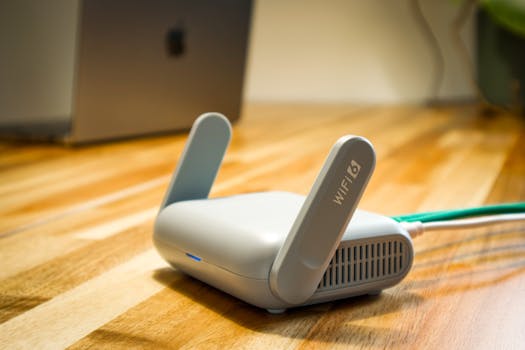
A sleek WiFi 6 router with antennas and cable on a wooden desk, perfect for modern home networks. Photo: Pascal 📷 / Pexels
Your Wi-Fi router is the undisputed gatekeeper of your home network, making its security paramount. It's the first and often the only barrier between the internet and all your connected devices. Therefore, learning how to secure your home network must begin with a comprehensive overhaul of your router's settings. Many routers come with default settings that are notoriously insecure, making them easy targets for even amateur hackers. The first and most critical step is to change the default administrative username and password. These are often generic, like 'admin/admin' or 'admin/password,' and are widely known and exploited. Choosing a strong, unique password that combines uppercase and lowercase letters, numbers, and symbols is non-negotiable. Next, ensure your router's firmware is always up to date. Firmware is the operating system of your router, and manufacturers regularly release updates to patch security vulnerabilities, improve performance, and add new features. Outdated firmware is a common entry point for attackers. Most modern routers offer an option to check for and install updates directly from the administrative interface, or you might need to download the firmware from the manufacturer's website and manually upload it. Make it a routine to check for updates at least quarterly. Disabling remote management is another crucial step. Unless you specifically need to access your router's settings from outside your home network (which is rarely the case for typical users), this feature should be turned off. Remote management can expose your router's administrative interface to the internet, creating a significant attack surface. Similarly, disable Universal Plug and Play (UPnP) if you don't explicitly require it. While UPnP allows devices to easily discover each other and establish connections, it can also be exploited by malware to open ports on your router without your knowledge, bypassing your firewall. Your Wi-Fi encryption method is vital. Always use the strongest available encryption standard, which is currently WPA3. If your devices or router don't support WPA3, WPA2-AES (not WPA2-TKIP) is the next best option. Avoid WEP and WPA-TKIP entirely, as these standards have known vulnerabilities and can be easily cracked. Choose a strong, complex Wi-Fi password (passphrase) for your network, ideally 12-16 characters long, combining different character types. This password protects who can connect to your Wi-Fi. Consider setting up a guest Wi-Fi network. Most modern routers offer this feature, allowing you to provide internet access to visitors without giving them access to your main network and its connected devices. This isolates potential threats from guest devices, preventing them from compromising your personal data or other smart home gadgets. You can often limit guest network bandwidth or set a time limit for access. Finally, regularly reboot your router. While primarily for performance, it can also clear out any temporary malicious code that might have found its way onto the device and forces a fresh start for security protocols. Implementing these robust router security measures forms the bedrock of a secure home network, significantly reducing your exposure to cyber threats.

Securing All Connected Devices and Implementing Network Best Practices

Smartphone displaying blockchain application resting on a laptop, symbolizing modern technology and finance. Photo: Morthy Jameson / Pexels
Beyond your router, every device connected to your home network represents a potential vulnerability. Securing these individual endpoints is a critical component of learning how to secure your home network comprehensively. This includes everything from your computers and smartphones to smart home devices (IoT), gaming consoles, and even network-attached storage (NAS) drives. Each device has its own operating system and software, which require vigilant attention to security. Regular software and operating system updates are non-negotiable. Manufacturers constantly release patches to fix newly discovered security flaws. Delaying these updates leaves your devices exposed to known exploits. Enable automatic updates whenever possible for all your devices, including your computer's OS (Windows, macOS, Linux), web browsers, and all applications. For smart devices, check their respective apps for firmware updates. If a device no longer receives updates from the manufacturer, it's a strong indicator that it might be time to replace it, as it will become increasingly vulnerable over time. Strong, unique passwords are fundamental. Reusing passwords across multiple accounts or devices is an invitation for trouble. If one service is breached, all others using the same credentials become immediately vulnerable. Utilize a reputable password manager to generate and store complex, unique passwords for every account. Enable two-factor authentication (2FA) or multi-factor authentication (MFA) wherever available. This adds an extra layer of security, typically requiring a code from your phone or a biometric scan in addition to your password, making it significantly harder for unauthorized users to gain access even if they have your password. Install and maintain robust antivirus and anti-malware software on all computers and smartphones. These programs actively scan for, detect, and remove malicious software, providing real-time protection against new threats. Keep their definitions updated daily. A firewall, often built into your operating system and router, should always be enabled. It acts as a barrier, controlling incoming and outgoing network traffic based on predefined security rules, blocking unauthorized access attempts. Consider network segmentation for enhanced security. If your router supports it, creating a separate VLAN (Virtual Local Area Network) for your IoT devices can isolate them from your main network where your sensitive data resides. This way, if an IoT device is compromised, the attacker won't have direct access to your computers or financial information. Similarly, a dedicated guest network (as mentioned in the router section) serves a similar purpose for visitors. Regularly review what devices are connected to your network. Your router's admin interface typically shows a list of connected clients. If you see an unfamiliar device, investigate it immediately. It could be an unauthorized user or a device you forgot about. Periodically change your Wi-Fi password to force all devices to reconnect, which can help shed any unwanted connections. For advanced users, employing a VPN (Virtual Private Network) can encrypt your internet traffic, even on your home network, adding another layer of privacy and security, especially when accessing sensitive information. For a deeper dive into protecting your digital identity, refer to resources on personal data protection strategies.

Advanced Security Measures and Common Mistakes to Avoid

A person typing on a keyboard connected to a laptop showing code, surrounded by wires. Photo: cottonbro studio / Pexels
Once you've covered the foundational aspects of how to secure your home network, it's time to explore advanced measures that can further bolster your defenses and identify common pitfalls to steer clear of. Implementing these additional layers of security can significantly reduce your attack surface and enhance your overall digital resilience. **Advanced Security Measures:** * **DNS Filtering:** Consider using a DNS filtering service (like OpenDNS or Cloudflare DNS) at the router level. These services can block access to known malicious websites, phishing sites, and adult content for all devices on your network, even before they load in your browser. * **Intrusion Detection/Prevention Systems (IDS/IPS):** Some higher-end consumer routers or dedicated network security appliances offer IDS/IPS capabilities. These systems monitor network traffic for suspicious patterns and can block potential attacks in real-time. * **Network Monitoring Tools:** Tools like Wireshark (for advanced users) can help you analyze network traffic to identify unusual activity or unauthorized connections. Even simpler network scanner apps can help you discover all devices connected to your network. * **Physical Security:** Don't overlook the physical security of your router. Place it in a secure location where unauthorized individuals cannot easily access it. A compromised router, if physically accessed, can be reset or reconfigured, bypassing all your digital security measures. * **Regular Backups:** While not directly a network security measure, regular backups of your important data are a crucial last line of defense. In the event of a successful ransomware attack or data corruption, a recent backup can save you from significant loss. **Common Mistakes to Avoid:** * **Ignoring Updates:** As emphasized, neglecting software and firmware updates is one of the biggest mistakes. Make it a habit to check for and install them regularly. * **Weak Wi-Fi Passwords:** Using easily guessable Wi-Fi passwords (e.g., your address, phone number, or simple dictionary words) makes your network vulnerable to brute-force attacks. * **Leaving Default Router Credentials:** This is a cardinal sin in network security. Always change them immediately after setting up a new router. * **Disabling Firewall:** Some users disable their firewall for perceived performance gains or troubleshooting, leaving their network completely exposed. * **Over-reliance on VPN:** While VPNs are excellent for privacy and security, they are not a substitute for securing your home network. A VPN encrypts your traffic but doesn't protect your router or other devices from direct attacks within your local network. * **Connecting Unknown Devices:** Be cautious about what you plug into your network. Unknown USB drives or devices could carry malware. * **Public Wi-Fi Habits at Home:** Don't assume your home network is automatically secure because it's 'private.' The same caution you exercise on public Wi-Fi (e.g., avoiding sensitive transactions) should, to some extent, carry over to your home network until it's properly secured. * **Lack of Regular Audits:** Network security isn't a set-it-and-forget-it task. Periodically review your settings, connected devices, and security practices to ensure they remain robust against evolving threats. By incorporating these advanced strategies and diligently avoiding common security blunders, you can create a truly resilient and secure home network environment, protecting your digital assets and privacy with confidence.

Comparison

FeatureBest OptionAlternative 1Alternative 2
Wi-Fi EncryptionWPA3WPA2-AESWPA2-TKIP (avoid)
Router Admin PasswordStrong Unique (12+ chars)Complex PassphraseDefault (NEVER)
Firmware UpdatesAutomatic/Regular ManualMonthly ChecksNever (High Risk)
Guest Network✓ (Isolated)✓ (Shared Password)✗ (No Guest Access)
Remote ManagementDisabledVPN-Secured AccessEnabled (High Risk)
Password ManagementPassword Manager + 2FAUnique PasswordsReused Passwords (High Risk)

What Readers Say

"This guide completely demystified how to secure my home network. I followed the steps, updated my router, and feel so much safer now. Highly recommend for anyone feeling overwhelmed by cybersecurity!"

Sarah J. · Austin, TX

"I thought I was tech-savvy, but this article highlighted several critical vulnerabilities I had overlooked. The advice on IoT device security was particularly insightful. My network feels much more robust now."

Mark D. · Seattle, WA

"After reading this, I implemented a guest network and changed all my default router passwords. The peace of mind knowing my data is better protected is invaluable. Thank you for such clear, actionable steps on how to secure your home network!"

Emily R. · Miami, FL

"The information is incredibly thorough, though some of the advanced sections required a bit of technical understanding. Still, the core steps for how to secure your home network are presented brilliantly and are easy to follow for anyone."

David L. · Denver, CO

"As someone running a home-based business, securing my network is paramount. This guide provided a structured approach to not just protect my personal data but also my professional assets. The section on device updates was a great reminder."

Jessica M. · Chicago, IL

Frequently Asked Questions

What is the single most important step to secure my home network?

The single most important step is to change your router's default administrative username and password immediately. Default credentials are widely known and are the easiest entry point for attackers. Once those are changed, ensure your Wi-Fi uses WPA3 or WPA2-AES encryption with a strong, unique passphrase.

Is it really necessary to update my router's firmware regularly?

Yes, it is absolutely necessary. Router firmware updates often include critical security patches that fix newly discovered vulnerabilities. Neglecting these updates leaves your router exposed to known exploits, making it a prime target for cybercriminals. Treat firmware updates like you would operating system updates for your computer.

How often should I change my Wi-Fi password?

While not as frequent as router firmware updates, changing your main Wi-Fi password periodically (e.g., every 6-12 months) is a good practice. It forces all connected devices to re-authenticate, shedding any unauthorized connections and ensuring that old credentials are no longer valid if they were ever compromised.

Does securing my home network require expensive equipment or software?

No, securing your home network primarily relies on good practices and utilizing features often already available in your existing router and devices. While advanced options exist, the most impactful steps—changing passwords, updating firmware, enabling encryption, and using a guest network—are free and immediately actionable. Investment in a good password manager or antivirus software is recommended but not always expensive.

How does a VPN compare to home network security measures?

A VPN (Virtual Private Network) encrypts your internet traffic, protecting your privacy and security when you're online, especially on public Wi-Fi. However, it's not a substitute for securing your home network. Home network security focuses on protecting your router, local devices, and the network itself from unauthorized access. A VPN adds a layer of privacy for your data in transit, but it doesn't secure your router's configuration or protect your smart devices from local network attacks.

Who should be concerned about securing their home network?

Everyone with an internet connection and connected devices in their home should be concerned. This includes individuals, families, and those who work from home. Even if you believe you have nothing to hide, a compromised network can lead to identity theft, financial fraud, privacy invasion, or your network being used as a platform for further cyber attacks.

Are smart home (IoT) devices a significant security risk?

Yes, smart home (IoT) devices can be a significant security risk. Many are designed with minimal security, often have default passwords, and may not receive regular security updates. A compromised IoT device can provide a backdoor into your entire home network, allowing attackers to access other devices or sensitive data. It's crucial to isolate them on a guest network if possible and ensure their firmware is always updated.

What are the future trends in home network security I should be aware of?

Future trends in home network security include more AI-powered threat detection integrated into routers, increased adoption of WPA3 and even WPA4, and a greater emphasis on micro-segmentation for IoT devices. Expect more automated security features, but also a constant evolution of sophisticated cyber threats targeting the growing number of connected devices.

Don't leave your digital life vulnerable. Take control of your security by implementing the strategies outlined in this guide on how to secure your home network today. Protect your data, devices, and peace of mind from evolving cyber threats.

Topics: secure home networkcybersecurity for homerouter security tipsnetwork privacyWi-Fi security
Leo List

DK Escorts LU Escorts AT Escorts SE Escorts FI Escorts CH Escorts DE Escorts HR Escorts IE Escorts GR Escorts CZ Escorts NO Escorts BE Escorts FR Escorts SI Escorts IL Escorts NL Escorts PL Escorts HU Escorts ES Escorts IT Escorts PT Escorts SK Escorts RO Escorts ZA Escorts UY Escorts US Escorts UK Escorts NZ Escorts AU Escorts
Brampton weed
Adultwork EstrelaBet Vai de Bet R7 Bet Betão Galera Bet Rainbet Bet9ja Shop SportyBet BetKing Sisal Loto Foot Hollywoodbets YesPlay Odibets RushBet Jugabet BetWarrior BetCity MSport betPawa Fortebet