How to Choose a Gaming Laptop: Your Ultimate Buying Guide
Unlock peak gaming performance and portability with the perfect laptop tailored to your needs and budget.
Find Your Perfect RigKey Takeaways
- ✓ GPU is the most critical component for gaming performance.
- ✓ CPU, RAM, and Storage also significantly impact experience.
- ✓ Screen size, refresh rate, and resolution are crucial for visual immersion.
- ✓ Budget considerations should balance performance with future-proofing.
How It Works
Determine what types of games you'll play (e.g., esports, AAA titles) and at what graphical settings you expect to play them. This will dictate the necessary hardware power.
Establish a clear budget range. Gaming laptops can vary wildly in price, and a realistic budget helps narrow down options without compromising essential features.
Focus on the GPU, CPU, RAM, and storage as your primary decision factors. These components directly influence in-game performance and overall system responsiveness.
Evaluate screen specifications like refresh rate and resolution, alongside keyboard quality, cooling, and port selection for a complete gaming experience.
Understanding Core Components: GPU and CPU for Gaming Performance
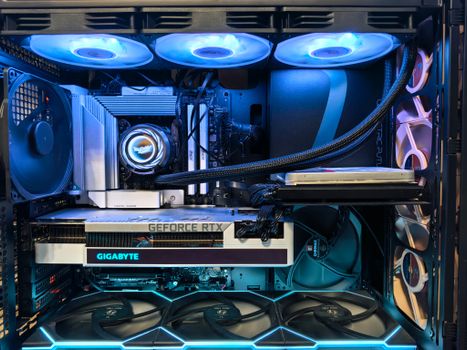 Photo: Andrey Matveev / Pexels
RAM, Storage, and Display: Enhancing Your Gaming Experience
 Photo: Paras Katwal / Pexels
Cooling, Ergonomics, and Portability: Beyond Raw Power
 Photo: Rajat Yadav / Pexels
Budgeting and Common Mistakes to Avoid When Buying a Gaming Laptop
Photo: Rajat Yadav / Pexels
Comparison
| Feature | Entry-Level (Budget) | Mid-Range (Balanced) | High-End (Premium) |
|---|---|---|---|
| Price Range | $800 - $1200 | $1200 - $2000 | $2000+ |
| GPU | RTX 3050/4050 | RTX 4060/4070 | RTX 4080/4090 |
| CPU | Intel i5 / Ryzen 5 | Intel i7 / Ryzen 7 | Intel i9 / Ryzen 9 |
| RAM | 8GB - 16GB DDR4 | 16GB - 32GB DDR5 | 32GB+ DDR5 |
| Storage | 512GB NVMe SSD | 1TB NVMe SSD | 1TB - 2TB NVMe SSD |
| Display | 1080p @ 120Hz/144Hz | 1080p @ 144Hz+/QHD @ 165Hz+ | QHD @ 240Hz+/4K @ 120Hz+ |
| Cooling | Basic | Good | Excellent |
| Portability | Moderate | Good | Variable (often heavier for max power) |
What Readers Say
"This guide helped me understand the difference between GPUs and how to prioritize my budget. I ended up with an RTX 4070 laptop that handles all my games beautifully without overspending."
Alex P. · Austin, TX"I was overwhelmed by all the options, but following the steps on how to choose a gaming laptop made the process clear. The section on cooling was particularly insightful, leading me to a model with great thermals."
Sarah L. · Seattle, WA"Thanks to this article, I avoided the mistake of focusing too much on the CPU. My new laptop with an RTX 4060 and 16GB RAM delivers consistent high frame rates in Warzone, exactly what I wanted."
Mark D. · Chicago, IL"The guide was mostly excellent, though I wish there was a bit more detail on specific brand recommendations. Still, it taught me how to compare specs effectively and I found a great deal."
Jessica R. · Miami, FL"As a casual gamer who also uses his laptop for work, understanding the balance between portability and power was key. This article provided exactly the insights I needed to make an informed decision for my mixed-use scenario."
David K. · Denver, COFrequently Asked Questions
What is the single most important component to consider when buying a gaming laptop?
The Graphics Processing Unit (GPU) is the single most important component for gaming performance. A powerful GPU directly impacts frame rates and graphical fidelity, ensuring a smooth and immersive gaming experience in modern titles. While other components are important, the GPU is the primary driver of in-game visuals.
Will a gaming laptop run hot?
Yes, gaming laptops, by their nature, will run hot due to the powerful components packed into a compact chassis. However, well-designed gaming laptops incorporate advanced cooling systems to manage this heat effectively, preventing thermal throttling and ensuring sustained performance. Always check reviews for a laptop's thermal performance under load.
How much RAM do I need for a gaming laptop?
For modern gaming, 16GB of RAM is generally considered the sweet spot, providing ample memory for most AAA titles and multitasking. While 8GB might suffice for older or less demanding games, 32GB is only truly necessary for very specific workloads or heavy content creation alongside gaming.
Are gaming laptops expensive?
Gaming laptops can range significantly in price, from under $1000 for entry-level models to over $3000 for high-end configurations. The cost depends heavily on the specifications (GPU, CPU, RAM, storage), screen quality, and build materials. It's possible to find a capable gaming laptop for most budgets, but higher performance commands a higher price.
How do gaming laptops compare to gaming desktops?
Gaming laptops offer portability and an all-in-one solution, making them ideal for gamers on the go or those with limited space. Gaming desktops typically offer better performance-to-price ratio, easier upgradability, and superior cooling, leading to potentially longer component lifespans and higher sustained performance. The choice depends on your priorities: portability vs. raw power and upgradability.
Who should buy a gaming laptop instead of a desktop?
A gaming laptop is ideal for individuals who need portability, such as students, frequent travelers, or those who attend LAN parties. It's also a great choice for users with limited space or who prefer an all-in-one solution without managing external monitors and peripherals constantly. If you value flexibility and mobility, a gaming laptop is your best bet.
Is it safe to leave my gaming laptop plugged in all the time?
Modern gaming laptops have smart charging features that prevent overcharging, so it's generally safe to leave them plugged in. However, some experts recommend occasionally draining the battery to around 20-30% and then recharging it to help maintain battery health over the long term. Constant heat from heavy gaming can also impact battery longevity.
What are the future trends in gaming laptop technology?
Future trends in gaming laptops include continued advancements in GPU and CPU power efficiency, leading to thinner and lighter designs without sacrificing performance. We can expect more widespread adoption of high-refresh-rate OLED screens, improved AI-driven upscaling technologies, more efficient cooling solutions (like vapor chambers), and potentially modular components for easier upgrades.
Armed with this comprehensive guide on how to choose a gaming laptop, you're now ready to make an informed decision. Take the plunge and invest in a machine that will deliver countless hours of immersive, high-performance gaming tailored to your exact needs and budget.