How to Choose a Smart Home Hub: Your Ultimate Guide
how to choose a smart home hub

How to Choose a Smart Home Hub: Your Ultimate Guide

Navigate the complex world of smart home hubs and discover the ideal central command for your automated abode.

Find Your Perfect Hub

Key Takeaways

  • ✓ A smart home hub centralizes control of diverse smart devices.
  • ✓ Compatibility with existing devices is the most critical factor.
  • ✓ Connectivity protocols (Zigbee, Z-Wave, Wi-Fi, Thread) dictate device support.
  • ✓ Cloud-based vs. local processing impacts speed, reliability, and privacy.

How It Works

1
Assess Your Current Smart Devices

Before selecting a hub, list all your existing smart bulbs, plugs, thermostats, and sensors. Note their brands and the wireless protocols they use (e.g., Wi-Fi, Zigbee, Z-Wave).

2
Define Your Automation Goals

Consider what you want your smart home to do. Do you need simple voice commands, complex routines, or advanced security monitoring? Your aspirations will guide your hub choice.

3
Understand Connectivity Protocols

Research the different wireless languages hubs speak: Wi-Fi, Zigbee, Z-Wave, and Thread. A multi-protocol hub offers the most flexibility and future-proofing for your smart home setup.

4
Evaluate Ecosystems and Features

Look into popular ecosystems like Apple HomeKit, Amazon Alexa, or Google Home, and decide which aligns with your preferences. Compare features like local control, voice assistant integration, and user interface.

Understanding Smart Home Hubs: The Brain of Your Connected Home
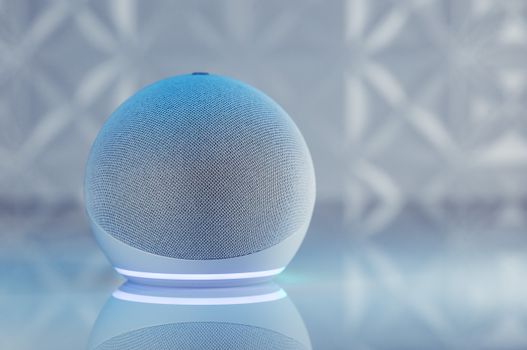
A sleek smart speaker with neon glow on reflective surface, showcasing modern technology. Photo: Jonathan Borba / Pexels
In the rapidly evolving landscape of smart home technology, a smart home hub serves as the central nervous system, orchestrating communication between various disparate devices. Imagine having dozens of smart gadgets from different manufacturers – light bulbs from Philips Hue, a thermostat from Ecobee, door locks from August, and security cameras from Arlo. Without a hub, these devices often operate independently, requiring separate apps, separate voice commands, and offering limited interoperability. This disjointed experience is precisely what a smart home hub aims to resolve. At its core, a smart home hub is a hardware device that connects to your home network, usually via Wi-Fi or Ethernet. Its primary function is to translate the different 'languages' or wireless protocols that smart devices use into a unified system. These protocols include Wi-Fi, Bluetooth, Zigbee, Z-Wave, and more recently, Thread. While many smart devices connect directly to your home Wi-Fi, a hub becomes essential when you start incorporating devices that use Zigbee or Z-Wave. These low-power mesh networks are incredibly efficient for small, battery-operated sensors and switches, creating a more robust and responsive smart home environment than relying solely on Wi-Fi. The benefits of a smart home hub extend far beyond mere device consolidation. A well-chosen hub enables advanced automation routines, often referred to as 'scenes' or 'routines.' For example, you can program a 'Good Morning' routine that simultaneously turns on your coffee maker, adjusts the thermostat, and raises the blinds, all with a single voice command or at a scheduled time. Hubs also allow for local processing of commands, meaning some automations can execute even if your internet connection goes down. This enhances reliability and can improve response times for critical functions like security or lighting control. Furthermore, a hub often provides a single, intuitive interface – usually an app on your smartphone – from which you can monitor and control all your connected devices, simplifying management and troubleshooting. Understanding these foundational aspects is the first step in learning how to choose a smart home hub that truly elevates your living experience.

Key Factors to Consider When Selecting Your Smart Home Controller
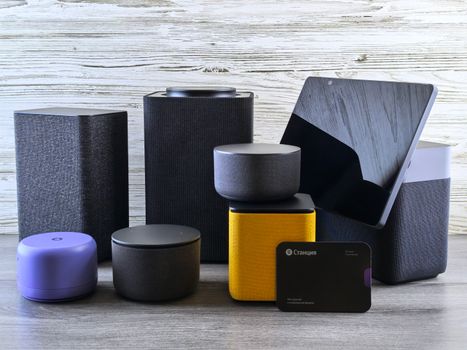
A collection of various smart home speakers and tablet displayed on a wooden surface. Photo: Andrey Matveev / Pexels
Choosing the right smart home controller is akin to selecting the operating system for your digital life; it dictates compatibility, functionality, and future expansion. Several critical factors demand your attention to ensure you make an informed decision that aligns with your specific needs and aspirations for a connected home. First and foremost is **compatibility with existing devices and ecosystems**. This cannot be overstated. If you already own smart devices – be it Philips Hue lights, a Ring doorbell, or an Ecobee thermostat – your chosen hub *must* be able to communicate with them. Investigate the supported protocols (Zigbee, Z-Wave, Wi-Fi, Bluetooth, Thread) and the specific brands or platforms the hub integrates with. Some hubs are ecosystem-agnostic, supporting a wide array of devices, while others are more closed, working best within a particular brand's family (e.g., Apple HomeKit). Starting with a list of your current devices will significantly narrow down your options. Next, **connectivity protocols** are the backbone of your smart home. Multi-protocol hubs that support Zigbee, Z-Wave, and Wi-Fi are generally the most versatile and future-proof. Zigbee and Z-Wave are mesh networks ideal for low-power sensors and switches, extending the range and reliability of your network. Wi-Fi is common for higher-bandwidth devices like cameras. Thread, a newer protocol, offers similar benefits to Zigbee/Z-Wave with enhanced security and IP-based addressing, and is gaining traction with Matter-compatible devices. Ensure your hub supports the protocols used by your desired devices. **Voice assistant integration** is another crucial consideration. Do you primarily use Amazon Alexa, Google Assistant, or Apple Siri? Most modern hubs offer integration with one or more of these, allowing you to control your entire smart home with voice commands. Seamless integration can significantly enhance the user experience. However, some hubs offer deeper, more native integration than others. Finally, assess **local vs. cloud control** and **privacy implications**. Many smart home hubs rely heavily on cloud servers for processing commands and storing data. While convenient, this can introduce latency, potential security vulnerabilities, and render your smart home partially or completely inoperable during internet outages. Hubs with strong local processing capabilities offer greater reliability, faster response times, and enhanced privacy, as your data stays within your home network. Understand the balance each hub strikes between these two approaches. Some hubs offer advanced features like geofencing, custom scripting, and energy monitoring. Prioritize features that genuinely add value to your daily life.

Popular Smart Home Hubs and Their Unique Strengths

A collection of various smart home speakers and tablet displayed on a wooden surface. Photo: Andrey Matveev / Pexels
The market for smart home hubs is diverse, with several prominent players offering distinct advantages. Understanding the unique strengths of each can help you pinpoint the best fit for your home automation journey. Each hub caters to slightly different user needs, from simplicity to advanced customization. **Samsung SmartThings Hub** has long been a powerhouse in the smart home arena, renowned for its broad compatibility. It supports Zigbee, Z-Wave, Wi-Fi, and Bluetooth, making it an excellent choice for homes with a mix of devices from various manufacturers. SmartThings offers a robust platform for creating complex automations and scenes, and it integrates well with both Amazon Alexa and Google Assistant. Its user interface is generally considered intuitive, though the sheer number of options can be overwhelming for beginners. SmartThings also allows for custom device handlers, enabling integration with even more niche devices. Its strength lies in its versatility and extensive community support, making it a favorite among power users and those with diverse device ecosystems. For users looking to build a truly interconnected and extensible smart home, SmartThings remains a top contender, offering a solid foundation for growth and experimentation within the smart home ecosystem. **Hubitat Elevation Hub** is often lauded by enthusiasts for its strong emphasis on local control and privacy. Unlike many cloud-dependent hubs, Hubitat processes most commands and automations locally, ensuring faster response times and continued functionality even without an internet connection. It supports Zigbee, Z-Wave, and Wi-Fi, offering excellent compatibility. While its user interface might have a steeper learning curve than more consumer-friendly options, it provides unparalleled customization and advanced automation capabilities. Hubitat is ideal for users who prioritize privacy, reliability, and want granular control over every aspect of their smart home without relying on external servers. **Amazon Echo (with built-in Zigbee hub)** and **Google Nest Hub Max (with Thread/Zigbee)** represent a different approach, integrating hub functionality directly into popular smart speakers or displays. These are excellent choices for users who are already invested in the Alexa or Google Assistant ecosystems and prefer simplicity and voice control. While they offer good support for Zigbee devices (and Thread for newer Nest models), their multi-protocol support isn't as extensive as dedicated hubs like SmartThings or Hubitat. They excel at basic automations and voice-activated commands, providing a convenient entry point into smart home control. However, they typically rely more on cloud services and offer less advanced customization than standalone hubs. **Homey Pro** is another strong contender, especially for users seeking maximum compatibility and local control with a user-friendly interface. It supports an impressive array of protocols including Wi-Fi, Bluetooth, Zigbee, Z-Wave, 433MHz, and Infrared, making it truly universal. Homey Pro also focuses heavily on local processing and offers a visual 'Flows' editor for creating automations, which is very approachable. It's a premium option but delivers a comprehensive and reliable smart home experience. Finally, **Apple HomeKit (via HomePod mini or Apple TV)** offers a highly secure and private ecosystem for Apple users. While not a standalone hub in the traditional sense, Apple devices like the HomePod mini and Apple TV act as HomeKit hubs, enabling remote access and automation for HomeKit-compatible devices. With the introduction of Thread support, HomeKit is becoming even more robust. It prioritizes user privacy and provides a very streamlined user experience within the Apple ecosystem, though device compatibility is generally more restricted to 'Works with HomeKit' certified products.

Common Mistakes to Avoid and Expert Tips for Optimal Performance

An IT professional operates a computer in a server room, managing network systems and connected devices. Photo: panumas nikhomkhai / Pexels
Navigating the smart home landscape can be tricky, and several common pitfalls can lead to frustration and a less-than-optimal experience. By being aware of these mistakes and implementing expert tips, you can ensure your smart home hub delivers on its promise of convenience and efficiency. **Common Mistakes to Avoid:** * **Ignoring Compatibility:** The biggest mistake is buying a hub without verifying its compatibility with your current or desired smart devices. A hub that doesn't speak the same 'language' as your devices is useless. * **Underestimating Connectivity Needs:** Relying solely on Wi-Fi for every smart device can quickly bog down your network, leading to slow response times and unreliable connections. Neglecting Zigbee or Z-Wave for low-bandwidth devices is a missed opportunity. * **Overlooking Local Control:** Many users don't consider the implications of cloud dependence until their internet goes out. If your smart home needs to function reliably even offline, prioritize hubs with strong local processing capabilities. * **Complex Automations Too Soon:** Trying to build intricate, multi-device automations immediately can be overwhelming. Start simple, master basic routines, and then gradually add complexity. * **Ignoring Network Infrastructure:** A robust home network is foundational. Weak Wi-Fi signals or an overloaded router can cripple even the best smart home hub. Ensure your network is up to par. **Expert Tips for Optimal Performance:** * **Start Small, Grow Gradually:** Begin with a few key devices and simple automations. As you gain familiarity, expand your system. This approach prevents overwhelm and allows you to learn what truly benefits your lifestyle. * **Prioritize Multi-Protocol Hubs:** Even if you only have Wi-Fi devices now, a hub supporting Zigbee, Z-Wave, and Thread offers flexibility for future expansion and better reliability for certain device types. * **Location, Location, Location:** Place your hub centrally in your home, away from large metal objects or other wireless interference sources. This optimizes signal strength for Zigbee and Z-Wave mesh networks. * **Regularly Update Firmware:** Keep your hub's firmware and device software updated. Manufacturers frequently release updates that improve performance, add features, and patch security vulnerabilities. * **Backup Your Configurations:** If your hub allows it, regularly back up your automations, scenes, and device settings. This can save you hours of re-configuration if something goes wrong. * **Consider a Mesh Wi-Fi System:** For larger homes, a mesh Wi-Fi system can provide more consistent and robust network coverage, benefiting all your smart devices and the hub itself. * **Leverage Voice Assistants:** Integrate your hub with your preferred voice assistant (Alexa, Google Assistant, Siri) for a truly hands-free and convenient smart home experience. This is one of the most satisfying aspects of a well-configured system.

Comparison

FeatureSamsung SmartThingsHubitat ElevationAmazon Echo (Zigbee)
Primary ProtocolsZigbee, Z-Wave, Wi-Fi, BluetoothZigbee, Z-Wave, Wi-FiZigbee, Wi-Fi
Local ControlPartial (some automations)Extensive (primary mode)Limited (cloud-dependent)
Ease of SetupModerateAdvancedEasy
Voice Assistant IntegrationAlexa, Google AssistantAlexa, Google AssistantAlexa (native)
Customization LevelHighVery HighModerate
Privacy FocusModerateHighModerate
Ideal UserVersatile, mixed devicesPower user, privacy-focusedAlexa user, simple setup

What Readers Say

"Before reading this guide, I was so confused about which hub to get for my random collection of smart plugs and lights. The advice on checking compatibility first was a lifesaver; it steered me towards a multi-protocol hub that works with everything!"

Sarah J. · Austin, TX

"This article clearly explained the difference between local and cloud control. I ended up choosing a hub with strong local processing, and my automations are so much faster and more reliable, even when the internet flickers. Huge improvement!"

Mark D. · Seattle, WA

"I followed the 'start small, grow gradually' tip, and it made my smart home setup so much less stressful. My lights and thermostat are perfectly automated now, and I feel confident adding more devices thanks to this guide."

Jessica L. · Denver, CO

"The comparison table was really helpful for narrowing down my options. I wish there was a bit more on Thread compatibility, but overall, it's a comprehensive resource for anyone trying to figure out how to choose a smart home hub."

Tom K. · Boston, MA

"As someone who previously struggled with multiple apps for different devices, this guide helped me consolidate everything under one hub. My home is finally truly 'smart' and integrated, making daily routines so much smoother."

Elena R. · San Francisco, CA

Frequently Asked Questions

What is the most important factor when choosing a smart home hub?

The most important factor is compatibility with your existing and desired smart devices. Ensure the hub supports the wireless protocols (e.g., Zigbee, Z-Wave, Wi-Fi, Thread) and specific brands you plan to use to avoid frustration and ensure seamless integration.

Do I really need a smart home hub if I only have Wi-Fi devices?

While many Wi-Fi devices can operate without a dedicated hub, a hub can still offer benefits like centralized control, advanced automation routines, and local processing. If you plan to expand with Zigbee or Z-Wave devices, a hub becomes essential.

How do I know which wireless protocols my devices use?

Check the product specifications or packaging of your smart devices. Manufacturers typically list the supported protocols like Wi-Fi, Bluetooth, Zigbee, Z-Wave, or Thread. This information is crucial for ensuring hub compatibility.

Are more expensive smart home hubs always better?

Not necessarily. While premium hubs often offer more features, broader compatibility, and better local control, the 'best' hub is the one that meets your specific needs and budget. A simpler, more affordable option might be perfect for a basic setup.

What's the difference between a smart speaker with a hub and a dedicated hub?

Smart speakers with built-in hubs (like some Amazon Echo or Google Nest devices) offer convenience and voice control but typically have more limited multi-protocol support and advanced features. Dedicated hubs provide broader compatibility, deeper customization, and stronger local control.

Who should prioritize local control in a smart home hub?

Users who prioritize privacy, security, and uninterrupted smart home functionality should prioritize hubs with strong local control. This ensures your automations and commands execute even without an internet connection and keeps more data within your home network.

Is my smart home hub secure from hackers?

Reputable smart home hubs employ various security measures, but no system is entirely impervious. Always use strong, unique passwords, enable two-factor authentication, keep firmware updated, and use a secure home network to minimize risks. Local processing can also enhance privacy.

What is Matter, and how does it affect smart home hubs?

Matter is a new universal connectivity standard designed to simplify smart home device compatibility across different ecosystems. Hubs that support Matter will be able to communicate with a wider range of devices more easily, making future smart home expansion more straightforward and interoperable.

Choosing the right smart home hub is a pivotal decision that shapes your entire connected living experience. By carefully considering compatibility, connectivity, and your unique automation goals, you can select a hub that transforms your house into an intuitively intelligent home, making your daily life simpler, safer, and more efficient. Take the leap and empower your smart home today!

Topics: how to choose a smart home hubsmart home controllerhome automation hubbest smart hubsmart home ecosystem
Leo List

DK Escorts LU Escorts AT Escorts SE Escorts FI Escorts CH Escorts DE Escorts HR Escorts IE Escorts GR Escorts CZ Escorts NO Escorts BE Escorts FR Escorts SI Escorts IL Escorts NL Escorts PL Escorts HU Escorts ES Escorts IT Escorts PT Escorts SK Escorts RO Escorts ZA Escorts UY Escorts US Escorts UK Escorts NZ Escorts AU Escorts
Brampton weed
Adultwork EstrelaBet Vai de Bet R7 Bet Betão Galera Bet Rainbet Bet9ja Shop SportyBet BetKing Sisal Loto Foot Hollywoodbets YesPlay Odibets RushBet Jugabet BetWarrior BetCity MSport betPawa Fortebet