Discover the Best Budget Laptops Under $500 for Every Need
July 24, 2026 15 min read 3,034 words
Unlock incredible value and performance without breaking the bank with our expert guide to affordable laptops.
Find Your Perfect Laptop
Navigating the Landscape of Affordable Laptops
 Photo: Yan Krukau / Pexels
In today's fast-paced digital world, a reliable laptop is no longer a luxury but a necessity. From students attending virtual classes to professionals working remotely, and even casual users enjoying streaming content, a personal computer is central to our daily lives. However, the perception that a capable laptop must come with a hefty price tag is a common misconception. The market for the best budget laptops under $500 has exploded, offering a surprising array of powerful and efficient machines that can handle most everyday tasks with ease. This guide is meticulously crafted to help you navigate this exciting segment, ensuring you make an informed decision without compromising on essential features or performance. We'll delve deep into what makes a budget laptop truly shine, debunk common myths, and highlight key specifications to look for. The sub-$500 category is incredibly diverse, encompassing everything from sleek Chromebooks designed for cloud-centric productivity to versatile Windows machines capable of running a wider range of applications. Understanding your primary use case is the first and most crucial step. Are you a student needing a machine for essays and research? A remote worker requiring solid video conferencing and document editing capabilities? Or perhaps you're looking for a secondary device for media consumption and light browsing? Each scenario dictates a different set of priorities, from screen size and resolution to processor power and battery life. We'll explore how to balance these factors effectively to find a laptop that feels tailor-made for your needs. Furthermore, we'll discuss the trade-offs inherent in this price bracket. While you won't find cutting-edge gaming performance or professional-grade video editing capabilities, you can certainly expect snappy performance for web browsing, email, word processing, spreadsheet management, and even some light photo editing. The advancements in processor technology, particularly from Intel's Celeron/Pentium lines and AMD's Athlon/Ryzen 3 series, have brought significant improvements in efficiency and speed to entry-level devices. Paired with solid-state drives (SSDs) and sufficient RAM, these budget-friendly machines can offer a surprisingly fluid user experience. Our goal is to empower you with the knowledge to identify genuine value, distinguishing between a truly capable budget laptop and one that might leave you frustrated. We'll also touch upon the importance of build quality and connectivity options, often overlooked but vital for long-term satisfaction. By the end of this comprehensive guide, you'll be equipped to confidently choose among the best budget laptops under $500, securing a device that not only meets your current demands but also offers a solid foundation for future digital endeavors. Prepare to redefine your expectations of what an affordable laptop can achieve. For more insights into general tech buying, check out our guide on
choosing the right electronics.
Key Specifications: What Matters Most Under $500
 Photo: Lukas Blazek / Pexels
When shopping for the best budget laptops under $500, understanding the core specifications is paramount. Unlike high-end models where every component is top-tier, the sub-$500 segment requires a more discerning eye to identify the most impactful features for your dollar. Let's break down the crucial components:
**Processor (CPU):** This is the brain of your laptop. For budget machines, you'll typically encounter Intel Celeron, Pentium, Core i3, or AMD Athlon and Ryzen 3 processors. While Celeron and Pentium are suitable for basic web browsing, email, and document editing, an Intel Core i3 or AMD Ryzen 3 offers a noticeable bump in performance, making multitasking smoother and handling slightly more demanding applications. Aim for an i3 or Ryzen 3 if your budget allows, as they provide a much better balance of power and efficiency for everyday tasks. Avoid older, less efficient processors if possible, as they can lead to a sluggish experience.
**Random Access Memory (RAM):** RAM is your laptop's short-term memory, crucial for multitasking. For a budget laptop, 4GB of RAM is the absolute minimum for basic use, but 8GB is highly recommended. With 8GB, you can comfortably run multiple browser tabs, a word processor, and a streaming service simultaneously without significant slowdowns. Anything less than 4GB will likely result in a frustratingly slow experience, especially with modern operating systems and web applications.
**Storage (SSD vs. HDD):** This is arguably one of the most critical factors for perceived speed in a budget laptop. Always prioritize a Solid State Drive (SSD) over a Hard Disk Drive (HDD). Even a smaller 128GB or 256GB SSD will make your laptop feel significantly faster than a larger 1TB HDD. SSDs offer lightning-fast boot times, quicker application loading, and overall snappier responsiveness. While 128GB might seem small, it's often sufficient if you primarily use cloud storage or external drives. If you need more local storage, a 256GB SSD is an excellent sweet spot. The performance difference between an SSD and HDD is so profound that it often outweighs a slight difference in processor speed.
**Display:** Most budget laptops feature 13-inch to 15-inch screens. A Full HD (1920x1080) resolution is highly desirable, offering sharper text and more screen real estate than lower resolutions like HD (1366x768). While some budget models still come with HD screens, a Full HD display significantly enhances the viewing experience for everything from documents to videos. Look for IPS panels if possible, as they offer better viewing angles and color reproduction, though they are less common in this price range.
**Battery Life:** For portability, battery life is crucial. Aim for at least 6-8 hours of real-world usage. Chromebooks often excel in this area due to their lightweight operating system. Windows laptops vary more, so check reviews for actual battery performance rather than manufacturer claims.
**Operating System:** Your choice will primarily be between Windows and Chrome OS. Windows offers broad software compatibility and familiarity, making it versatile for various tasks. Chrome OS is a lightweight, cloud-centric operating system ideal for web-based work, students, and users who prioritize simplicity, security, and long battery life. It's less suited for heavy offline software or gaming. Understanding these specifications will empower you to make an informed decision and select a laptop that truly meets your performance expectations within your budget.
Top Contenders: Best Budget Laptops Under $500 for 2024
 Photo: Mikhail Nilov / Pexels
The market for the best budget laptops under $500 is highly competitive, with manufacturers constantly pushing the boundaries of what's possible at this price point. While specific models can fluctuate in price and availability, certain brands consistently offer strong contenders. Here, we highlight categories and common features you’ll find in the top-performing budget laptops, helping you identify excellent value.
**Chromebooks: The Cloud-Powered Powerhouses**
For many users, especially students and those primarily working within a web browser, a Chromebook is an unbeatable option under $500. Brands like Acer, Lenovo, HP, and Asus consistently produce excellent Chromebooks. They run on Google's Chrome OS, which is lightweight, secure, and incredibly fast. Key advantages include instant boot-up times, long battery life (often 10+ hours), automatic updates, and seamless integration with Google's ecosystem (Docs, Sheets, Drive). While they rely heavily on internet connectivity, most modern Chromebooks support Android apps, expanding their utility significantly. Look for models with at least an Intel Celeron N-series or MediaTek Kompanio processor, 4GB or 8GB of RAM, and 64GB or 128GB of eMMC or SSD storage. A Full HD (1920x1080) display is a major plus. Chromebooks like the Acer Chromebook Spin 311 or the Lenovo Chromebook Duet (a 2-in-1 detachable) often fall within this budget and offer fantastic value for productivity and media consumption. They are ideal for those who don't need to run demanding Windows-specific software.
**Windows Laptops: Versatility on a Budget**
If you require the full functionality of Windows for specific software, gaming, or simply prefer the familiar interface, there are solid Windows laptops available under $500. This segment often requires more careful selection to avoid underpowered machines. Look for models featuring Intel Core i3 (10th generation or newer) or AMD Ryzen 3 (3000 series or newer) processors. These CPUs provide a much better experience than older Celeron or Pentium Windows machines. Crucially, aim for at least 8GB of RAM and a 256GB SSD. This combination ensures smooth multitasking and fast system responsiveness. Brands like Acer (Aspire series), Lenovo (IdeaPad series), HP (Pavilion or basic Laptop series), and Dell (Inspiron series) frequently offer configurations that meet these criteria. You might find models with 14-inch or 15.6-inch Full HD displays, which are excellent for productivity and media. While dedicated graphics cards are rare at this price, integrated graphics (like Intel UHD or AMD Radeon Graphics) are sufficient for basic tasks and light gaming. Some excellent examples include the Acer Aspire 3 or the Lenovo IdeaPad 1, which often provide a balanced performance-to-price ratio. Remember to check for decent port selection (USB-A, USB-C, HDMI) and Wi-Fi 5 or Wi-Fi 6 for good connectivity. For more on optimizing your tech, explore our tips on
maximizing device performance.
**Refurbished Options: Unlocking Premium Features**
Don't overlook certified refurbished laptops from reputable retailers. Sometimes, a slightly older, higher-tier model can be purchased for under $500 in excellent condition, offering better build quality, a more powerful processor (like an older i5 or Ryzen 5), or a superior display than a brand-new budget laptop. Always ensure the refurbishment comes with a warranty and is from a trusted source. This can be a fantastic way to get more bang for your buck if you're comfortable with a non-new device. The key is to balance the age of the components with the potential performance boost. Always check the generation of the processor and the type of storage to ensure it's still relevant for modern use.
Tips for Maximizing Your Budget Laptop Experience & Common Mistakes to Avoid
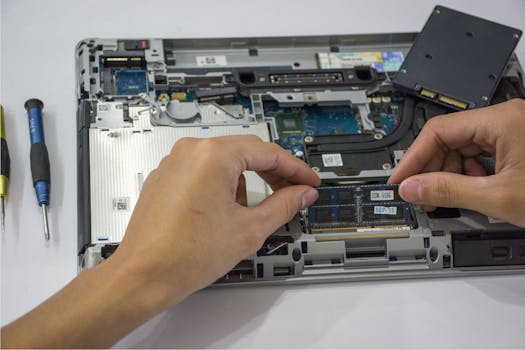 Photo: Elias Gamez / Pexels
Even the best budget laptops under $500 can be optimized for an even better user experience. Conversely, certain pitfalls can quickly turn a good purchase into a frustrating one. Here are some essential tips and common mistakes to avoid:
**Tips for Maximizing Your Experience:**
* **Regular Software Updates:** Keep your operating system and applications updated. Updates often include performance improvements, bug fixes, and security patches that can make a noticeable difference, especially on less powerful hardware.
* **Manage Startup Programs:** Many applications automatically launch when your laptop starts, consuming valuable RAM and CPU cycles. Use your operating system's settings (Task Manager on Windows, System Preferences on macOS, or Chrome OS settings) to disable unnecessary startup programs.
* **Utilize Cloud Storage:** With potentially smaller SSDs, leverage cloud services like Google Drive, OneDrive, or Dropbox to store large files. This frees up local storage and can improve performance. It also provides a convenient backup solution.
* **Browser Optimization:** Modern web browsers can be resource hogs. Use extensions like 'The Great Suspender' to automatically suspend inactive tabs, reducing RAM usage. Consider lighter browsers if you find your current one too demanding.
* **External Peripherals:** Invest in a good external monitor, keyboard, and mouse if you primarily use your laptop at a desk. This can significantly enhance productivity and ergonomics, transforming your budget laptop into a more comfortable workstation.
* **Lightweight Software Alternatives:** If you find certain applications too slow, look for lighter, web-based, or open-source alternatives. For example, Google Docs/Sheets instead of Microsoft Office desktop apps, or GIMP instead of Photoshop for basic image editing.
**Common Mistakes to Avoid:**
* **Prioritizing HDD over SSD:** As mentioned, an HDD will cripple the perceived speed of any laptop, regardless of other specs. Always opt for an SSD, even if it means less storage capacity.
* **Skimping on RAM:** While 4GB might seem acceptable on paper, it's often barely enough for modern operating systems. 8GB is the sweet spot for smooth multitasking. Less than 8GB will lead to constant slowdowns and frustration.
* **Ignoring Processor Generation:** A Core i5 from 2015 is often slower than a Core i3 from 2022. Always check the generation of the processor, not just the model number, to ensure you're getting relatively modern performance.
* **Overlooking Display Resolution:** A 1366x768 display on a 15.6-inch laptop can make text appear pixelated and reduce screen real estate. Aim for Full HD (1920x1080) for a much better visual experience.
* **Expecting Gaming Performance:** While some budget laptops can handle very light, older games, don't expect to play modern AAA titles. Integrated graphics are not designed for intensive gaming.
* **Neglecting Build Quality:** While you can't expect premium materials, read reviews about hinge durability, keyboard feel, and overall chassis sturdiness. A flimsy laptop will not last long, regardless of its internal specs.
* **Buying Without a Warranty:** Even budget laptops should come with a manufacturer's warranty. This protects you against defects and provides peace of mind. Avoid buying from sellers who don't offer any form of guarantee.
By following these tips and avoiding common mistakes, you can ensure your investment in a budget laptop provides long-lasting satisfaction and efficient performance for your everyday needs.
